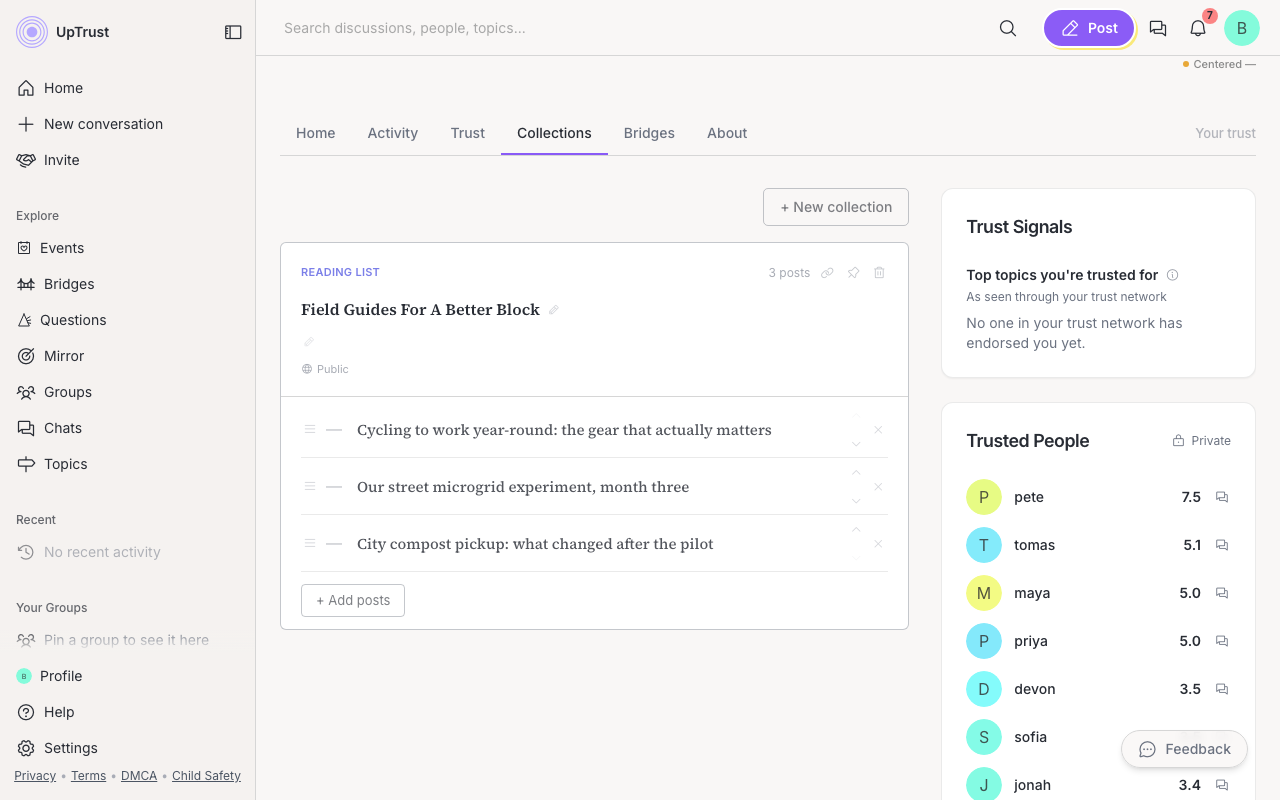
A collection is a group of saved posts you put together. It lets you keep the posts you want to find again and gather them into lists you can read later or show to others.
Where to find it: Use the ... (more options) button on any post, then choose Add to collection.
Save a post
- Open the post you want to keep.
- Click the ... button and choose Add to collection.
- Check the collection you want, or make a new one.
- To make a new one, click New collection, give it a name, and pick a type like Reading list or Bookmarks.
Find your collections
Your collections live on the Collections tab of your profile. The quick way there is More in the left sidebar, then Bookmarks. Open a collection to read everything you saved. Groups have collections too, so members can build shared reading lists together.
Bookmarks stay private
Share a collection
Every public collection has a small link icon on its card. Tap it to copy a share URL (paths look like /collection/…). Anyone with the link can open that collection, even when they are logged out. The page shows who made it and a breadcrumb back to their other public lists.
Your public collections also have a listing page at /collections/your-username. That page works without an account, so it is a good place to send people who only want your reading lists.
On your own Collections tab, use the up and down arrows next to each card to reorder your lists. Inside a list, you can drag or move individual posts the same way.
Collections in the app
The mobile app has collections too. Tap ... on any post to save it, and open the Collections tab on a profile or a group to read them. Tap a collection to open it, where you can rename it, write a description, flip it between public and private, reorder posts, and copy its share link. Adding a post is always done from the post itself in the app, so there is no search-and-pick list there.