Group money is a shared record of who put in, what was spent, and what is left. It keeps everyone looking at the same book, so collecting for a trip, a party, or monthly dues stays clear and honest.
Where to find it: Open your group and click Money in the left rail. You only see it when an admin has turned it on.
How it works
- An admin starts a fund and gives it a name, like 'Block Party 2026'. A fund can be a pool, or an endowment with an optional target and a floor it should not spend below.
- Members add what they put in. You can mark money as already sent or as a pledge for later, and come back to mark a pledge sent once you have paid.
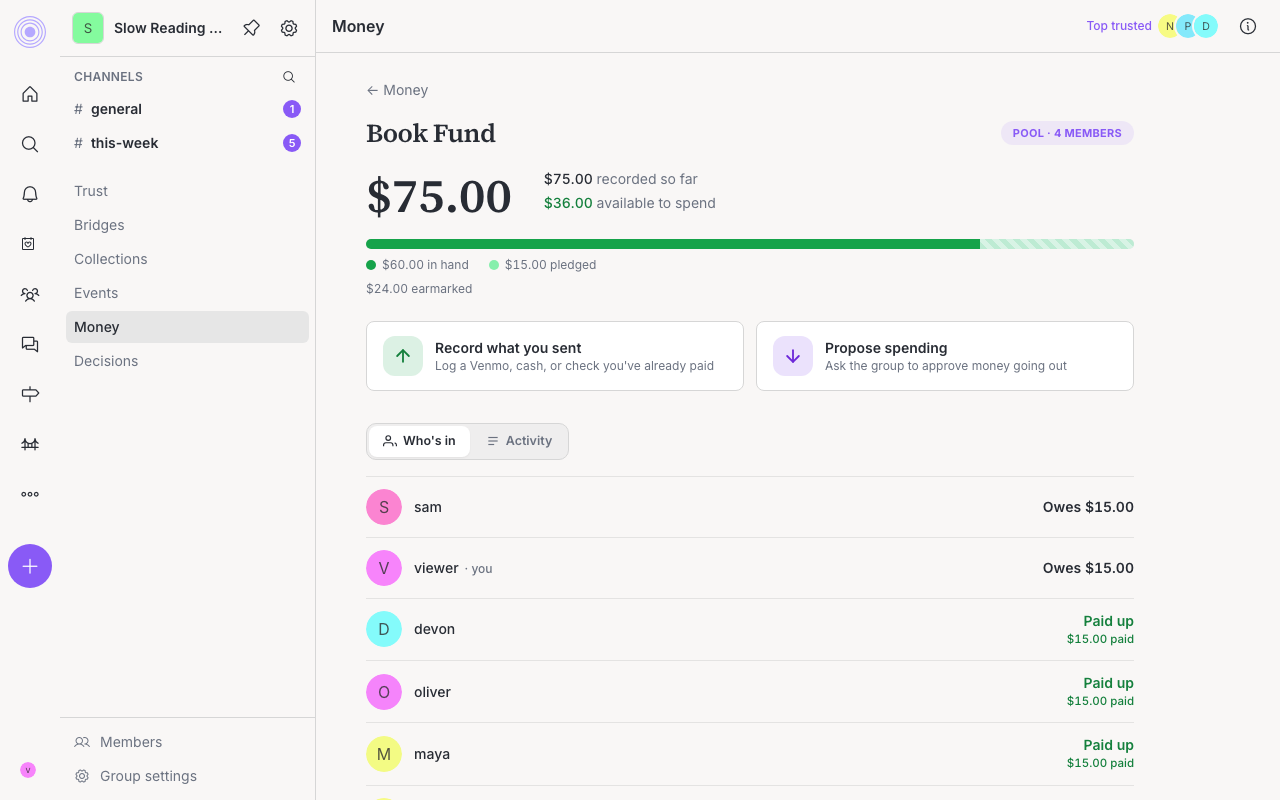
- A fund has two views: Who's in shows each member and what they have given, and Activity is the running ledger of every put-in and payout.
- Everyone in the group sees the same book, so nothing is hidden.
UpTrust does not hold or move money. You still settle up the way you already do, like Venmo, cash, or a check. The fund just keeps the shared record straight.
Dues: track who owes
If a fund is for dues, an admin can set an amount each member owes. The Who's in list then shows where everyone stands at a glance:
- Paid up. They have covered what they owe.
- Covered. Their paid and pledged amounts add up to what they owe.
- Owes $X. They still have some to put in.
Dues are a simple tracker, not a bill. There is no automatic charge and no set schedule, just a clear picture of who has paid. An admin can give anyone who still owes a friendly Nudge as a reminder.
Spending the money
Anyone can propose spending from a fund, including paying someone outside the group. How a payout is split can be custom, or you can choose members and split one total equally between them. How a payout is approved depends on your group's setup: an admin can sign off on some requests directly, or a request can go to the group as a Decisions proposal and be settled by the group's rules. Either way, the spending shows up in the ledger for everyone to see.
Turn it on or off
Money is off for most groups until an admin turns it on. To change it, an admin opens Group settings and ticks the Money checkbox. When it is off, the Money tool is hidden for everyone. Turning it off does not delete anything, and turning it back on brings it all back.
It stays a record, for now