UpTrust has a few main areas, and once you know where they live, getting around is quick. This page shows you what each part does so you spend less time hunting and more time reading.
Where to find it: On a wide screen, the left sidebar is on every page once you're signed in. On a phone, look at the bar along the bottom of the screen and the bar across the top.
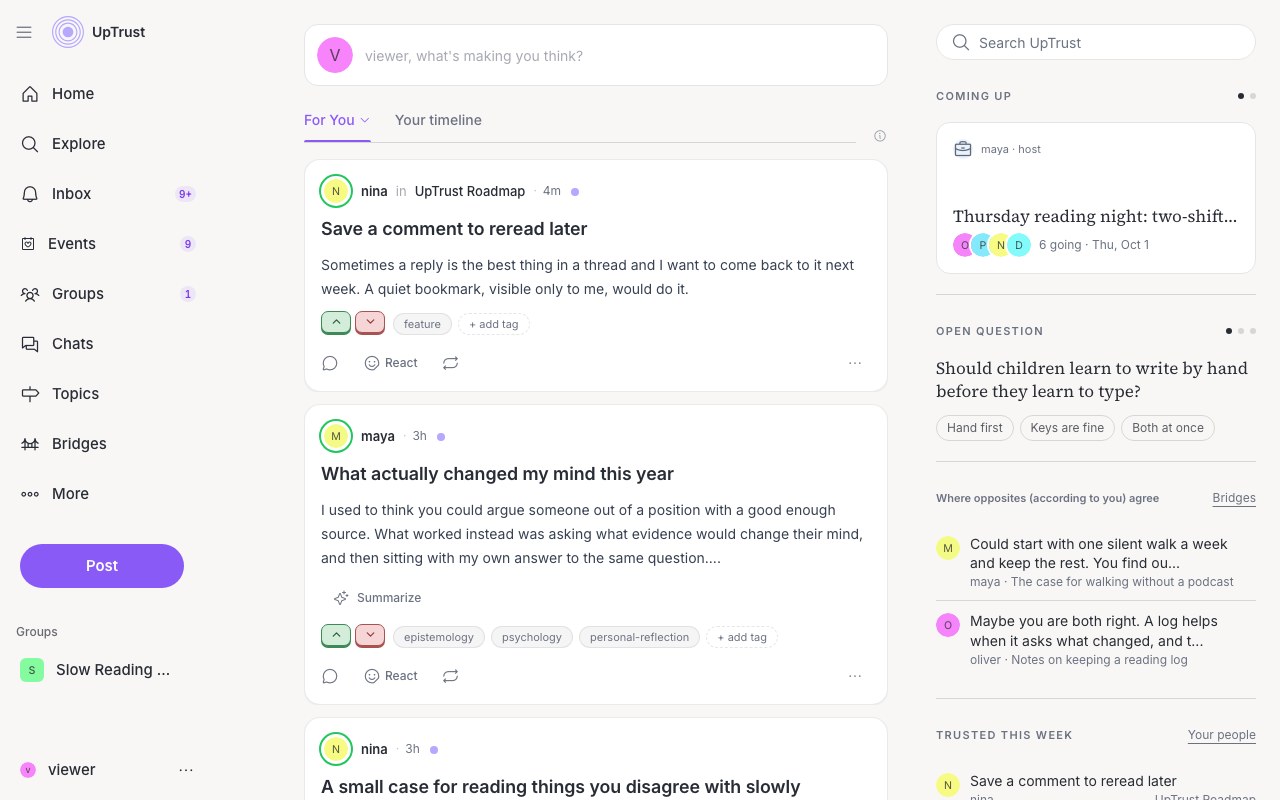
The home feed
Your home page is the feed of posts from the people and topics you trust. The more you vote, the better it gets at showing you things you care about. Click Home any time to come back to it.
Above the feed is a row of topic pictures. Click one to see only that topic. A chip shows which topic is on, and its x clears it. All topics at the end of the row opens the full list.
The small arrow next to the For You tab opens a menu. Under Sort you can pick new, uptrust, or trust. Under Lenses you can read the feed through a different view. When a lens is on, the tab shows its name instead of For You.
On a wide screen, a column on the right adds a search box and a few short cards, like Coming up for your next event, an Open question, Trusted this week, and Where you stand. Your quest sits at the bottom of that column.
The left sidebar
On a wide screen, the list at the top is short on purpose. In this order:
- Home, your feed.
- Search, with the search box and rooms to wander into.
- Events, what is coming up.
- Groups, what is coming up and what moved in every group you are in. If you are in just one group, it opens that group.
- Inbox, your replies, mentions, invites and other notifications.
- Chats, your direct messages.
- Topics, every subject people are talking about.
- Bridges, posts that landed with people who disagree.
- Bookmarks, the posts you saved.
- Profile, your own page.
- More, which opens a menu of the rest (see below).
Events, Groups, Inbox, and Chats show a small count when something new is waiting there.
Under the list is one purple Post button. Click it to write a post.
Below that is Groups. It lists the groups you have pinned, then the ones you used most lately. Hover a group and click the pin to pin or unpin it. If you are not in any group yet, you will see Join a group instead.
At the very bottom is your name and picture. Click it to open your account menu (see below).
The More menu
Click More to find the places you visit now and then. The first part is for browsing:
- Questions, big disagreements mapped out.
- Asks, what people here are asking.
- Friends, the people you trust.
- Experiments, things we are still trying out.
Under a line come your tools, which read or tune your own feed:
- Mirror, how you come across. Your profile links to it too, with How you come across beside your name.
- Lenses, a demo of reading posts through different points of view.
- Calibrate, Your field, and Your X reading, which tune or explain your own feed.
- Import, to bring your intro from an AI assistant.
- Points of view, the AI voters, and which of them trust you.
Links to Privacy, Terms, and our other policies sit at the bottom of the More menu, and of the account menu on a phone.
The left rail can fold down to icons only. While you read Help, it collapses that way on its own so the article has more room. Hover or click the rail edge when you want labels back.
Your account menu
Everything that is yours lives in one menu. On a wide screen, open it from your name at the bottom of the left sidebar. On a phone, tap your picture at the top left. It has:
- Profile, Your trust (only you can see it), Bookmarks, Drafts, and Invite.
- Quest, Settings, Help, and Feedback.
- A Light, Dark, or Auto theme switch.
- Sign out.
While you are new, it also has a way to hide or show Make it yours. Drafts shows a count when you have drafts waiting.
Finding things
There is no bar across the top of the page on a wide screen. To search, click Search and use the box at the top of that page, or the one at the top of the right column on your home page.
On a phone?