You write somewhere else. A blog, a newsletter, a site of your own. You want it on your profile. Anyone can say "that blog is mine", so saying it is not enough.
There are two ways to show it. Which one is yours depends on a single question: does your platform let you add code to your pages?
Where to find it: Settings, then Connect your accounts, then Verify a site.
If you can add code
We give you a short piece of code. You paste it on your homepage. We go and read that page, and look for it.
This is hard to fake. Only someone who can change the site can put code on it. If you can change what is on the page, the page is yours.
Two details matter. Your code works only for you, and only on that one site. It is signed, like a ticket with your name and one address printed on it, so copying someone else's does nothing. And we read only the homepage, at the exact address. Not a page inside the site.
If your platform refuses code
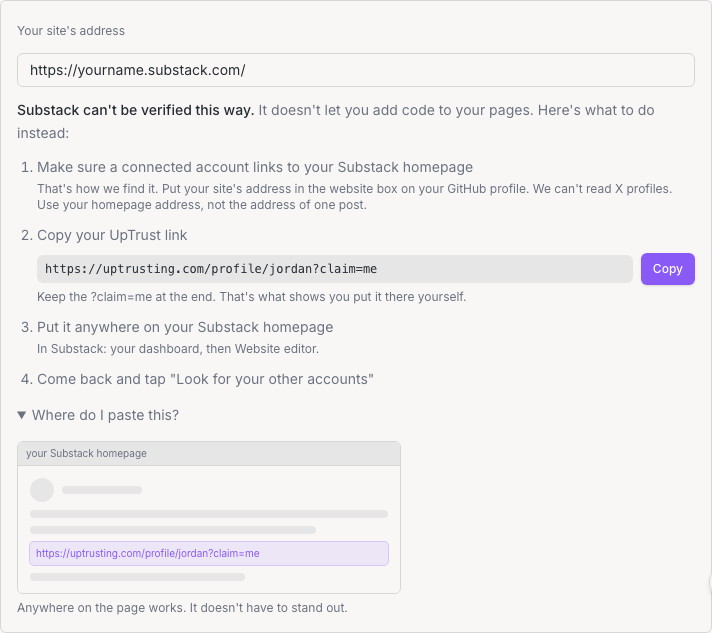
Substack will not let you paste code. Neither will Medium, or a published Notion page. So we use two arrows that have to answer each other.
An account we already know is yours points at your blog. Your blog points at your UpTrust profile.
One arrow proves nothing. I can point at the New York Times from my GitHub all day and it does not become mine. A stranger's blog can mention me without my having anything to do with it. Both together mean the person who holds your GitHub and the person who holds your blog each made the same choice, on their own. Usually that is one person.
Keep the bit on the end
The link we hand you ends in ?claim=me. Keep it.
Without it, being mentioned would be enough. A team page listing ten profiles, a comment box that shows people's websites: those pages carry your link with no help from you. The ?claim=me is the part you put there on purpose. That is the difference between "this page talks about me" and "I put something here".
If nothing shows up
?claim=me. Some editors trim the end of a web address on their own, and that is the part that counts.What we cannot stop
If you can publish on a site's homepage, a comment that appears there for example, you can put your link on it and attach that site. From outside, that looks the same as someone writing on their own site.
What it gets you stays small. The site shows in your list on the Connect page. It does not become a verified identity, it does not feed your trust score, and the link expires if you do not confirm it right away.