The Decisions tool lets a group act together: post in the group's name, spend its shared money, update its public summary, or change its own rules. It gives everyone a clear, fair way to settle things instead of guessing what the group wants.
Where to find it: Open your group and click Decisions in the left rail. You must be a member to take part.
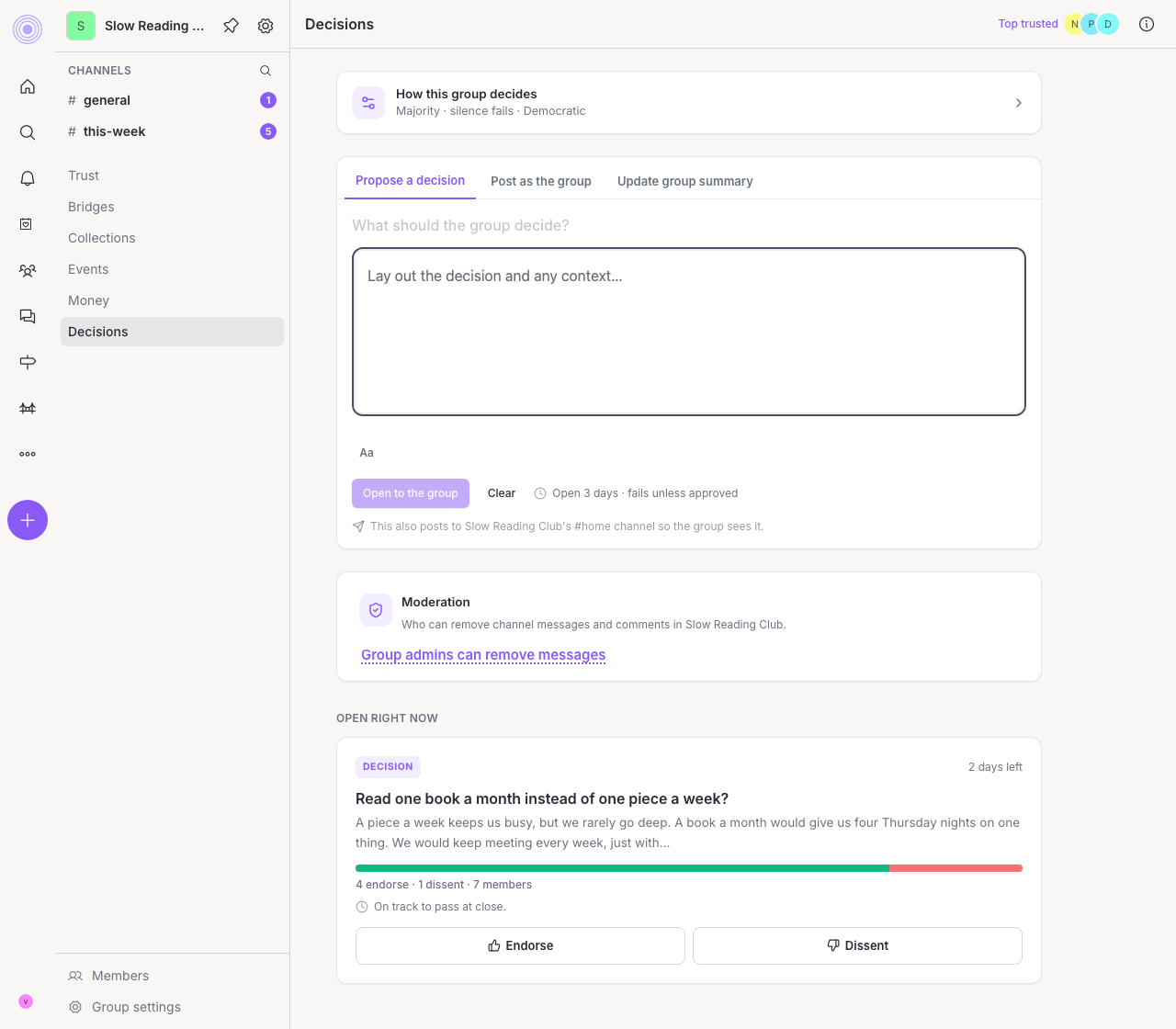
Start a proposal
At the top of the page you choose what kind of proposal to make:
- Propose a decision. Put an open question to the group and let people weigh in.
- Post as the group. Publish a post in the group's name, not your own.
- Update group summary. Suggest new wording for the group's public description. The box starts with the current text so you can edit it.
Spending money and rule changes also run as proposals. Spending starts from the Money tab, and rule changes start from the group's rules (below). Every proposal also posts to the group's #home channel, so the group sees it.
How a decision settles
- A proposal opens for everyone to weigh in. Members can endorse it if they agree or dissent if they do not. You can change your mind while it is open.
- The proposal stays open until the group's chosen way of deciding settles it, or until its time window runs out.
- When it closes, the result shows as Published, Rejected, Expired, or Withdrawn. Open proposals and finished ones both show on the Decisions page.
A heads up before it closes
Who decides
Each group sets how its proposals are settled. The choices are:
- Whoever proposes, after asking the group can make the call. The advice window is required, but the advice does not bind the proposer.
- Any admin can decide.
- A majority vote, with a passing line and an optional quorum you set.
- The people most trusted on the topic, whose votes carry more weight. This is UpTrust's own way of deciding.
- A small council of the top few most trusted members.
- One named member you choose.
The group's rules
A short How this group decides summary sits at the top of the page in plain words. Tap an underlined word to change a rule. While a group is first being set up, an admin can save the rules right away. After that, a change to the rules becomes its own proposal, so the rules cannot shift without the group's say so.
New groups start from Advice process, the recommended setup. You can also pick one of the ready-made setups under Start from:
- Advice process. Whoever proposes makes the call, after the group has had time to advise.
- Friends. Things pass quietly unless someone objects, and admins can move fast.
- Founder-led. One person you choose makes the calls.
- Democratic. Majority vote on nearly everything, one member one voice.
- Board. Decisions need a quorum and stay on the record, built for formal groups.
- Trust-led. The people most trusted on a topic carry more weight on it.
- Consensus. The group moves only when there are no real objections.
Moderation
The Decisions tab also sets who can remove channel messages and replies. A group can keep that power with admins, leave removal to authors only, give it to the top trusted members, or choose named members.
Moderators can remove a message or reply and add a reason for the author. They cannot edit someone else's words. After the group is set up, changing this rule becomes a proposal like any other rule change.